Online Booking
Patient self-scheduling from a shareable booking link
Phone-based scheduling wastes your staff's time and limits when patients can book. Formisoft's online booking page gives every practice a shareable link where patients self-schedule appointments 24/7, from any device.
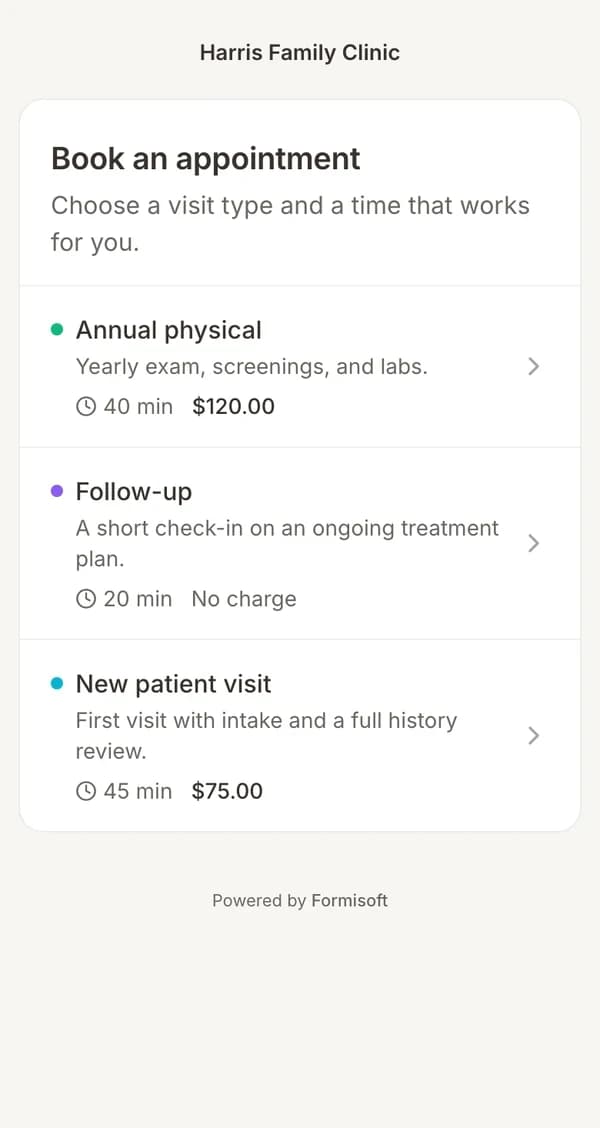
Patients visit your booking link, choose an appointment type, select a provider (or let the system assign one), and pick from real-time available slots. If payment is required, they pay during booking through Stripe. If an intake form is attached to the appointment type, it's sent automatically after booking. The entire flow is mobile-optimized and detects the patient's timezone so they always see times in their local time.
Your team controls everything from the dashboard: which appointment types are bookable online, which providers appear, slot durations, buffer times, and whether payment is collected upfront. The booking page matches your practice name and works on any device. Share the link on your website, in emails, on social media, or anywhere patients can click.
How it works
Enable Your Booking Page
Turn on online booking from your dashboard settings. Your practice gets a unique booking link you can share anywhere.
Configure Appointment Types
Choose which appointment types are available for online booking. Set durations, prices, and attach intake forms to each type.
Share the Link
Add the booking link to your website, email signatures, social media, or text it directly to patients. Anyone with the link can book.
Patients Self-Book
Patients pick an appointment type, choose a provider, select an available time, and confirm. Payment and intake forms are handled automatically.
Key features
Everything included with online booking, built into the platform.
Shareable Booking Link
Every practice gets a unique booking URL. Share it on your website, social media, emails, or anywhere patients can click to book.
Appointment Type Selection
Patients choose from the appointment types you've made available for online booking. Each type shows its name, duration, and price.
Provider Selection
Patients can pick their preferred provider or let the system assign one based on availability. You control which providers appear.
Real-Time Availability
Available time slots update in real time based on each provider's schedule. Booked and blocked slots never appear.
Payment Collection
Collect deposits or full payment at the time of booking through Stripe. Patients pay before their visit, reducing no-shows.
Intake Form Auto-Send
When an intake form is attached to an appointment type, it's sent to the patient automatically after they book.
Mobile-Optimized
The booking page works perfectly on phones, tablets, and desktops. Patients can book from any device without downloading an app.
Timezone Detection
The booking page detects the patient's timezone automatically. Patients always see available times in their local time.
Expected results
Ideal for
Frequently asked questions
How do patients find my booking page?
You get a unique booking link (e.g., formisoft.com/book/your-practice). Share it on your website, in email signatures, on social media, or text it directly to patients. Anyone with the link can book.
Can I control which appointment types are bookable online?
Yes. You choose which appointment types appear on the booking page. You can also control which providers are available for each type, set durations, and attach intake forms.
Does online booking prevent double-booking?
Yes. The booking page shows only genuinely available time slots based on each provider's schedule. Once a slot is booked, it disappears from availability in real time.
Can I collect payment when patients book?
Yes. If an appointment type has a price set, patients pay through Stripe during the booking flow. You can require payment upfront or make it optional.
Related
Appointment Scheduling
Never double-book again — intake forms sent with every appointment
Learn moreFeatureOnline Payments
Collect payments directly through your intake forms
Learn moreFeaturePatient Notifications
Automated email and SMS for every step of the patient journey
Learn moreWorkflowNew Patient Online Booking
From first click to chart-ready in minutes
Learn moreUse CaseAppointment Scheduling & Intake
Connect scheduling with automatic intake form delivery
Learn moreUse CaseNew Patient Intake
Digitize your entire new patient onboarding process
Learn moreUse CasePatient Intake for Med Spas
Polished digital intake for aesthetic and wellness clinics
Learn moreReady to streamline your practice?
Start your free trial and see how online booking works in Formisoft. Every feature is included from day one.