CorePopular

Patient Management

Automatic patient records from every form submission

Every form submission in Formisoft automatically creates or updates a patient record. When a new patient completes an intake form, the system detects their name, date of birth, contact information, and insurance details — then creates a structured patient profile without any manual entry from your staff.

Patient Record
SJ
Sarah Johnson
DOB: Mar 15, 1985 · Female
3
Medications
1
Allergies
Aetna
Insurance
Form History
New Patient IntakeJan 15
Follow-up VisitFeb 3

Patient records include medical history, allergies, current medications, active conditions, emergency contacts, and insurance information. As patients complete additional forms — follow-up visits, screenings, consent documents — their record grows automatically. Your clinical team sees a complete history of every form the patient has submitted, organized chronologically.

For practices migrating from paper or another system, Formisoft supports bulk CSV import so you can bring your existing patient roster in minutes. Need to share data with another system? Export your patient list as a CSV at any time. Combined with the intake form auto-detection, patient management in Formisoft is designed to minimize manual data entry and keep records accurate and up-to-date.

How it works

1
Step 1 of 4

Patient Submits a Form

When a patient completes any intake form, Formisoft automatically detects patient fields like name, date of birth, phone, email, and insurance information.

2
Step 2 of 4

Record Created or Updated

If it's a new patient, a record is created automatically. If they already exist, the record is updated with the latest information from the form submission.

3
Step 3 of 4

Medical History Builds Over Time

Each form submission adds to the patient's record. Allergies, medications, conditions, and insurance details accumulate across all visits.

4
Step 4 of 4

Access and Export Anytime

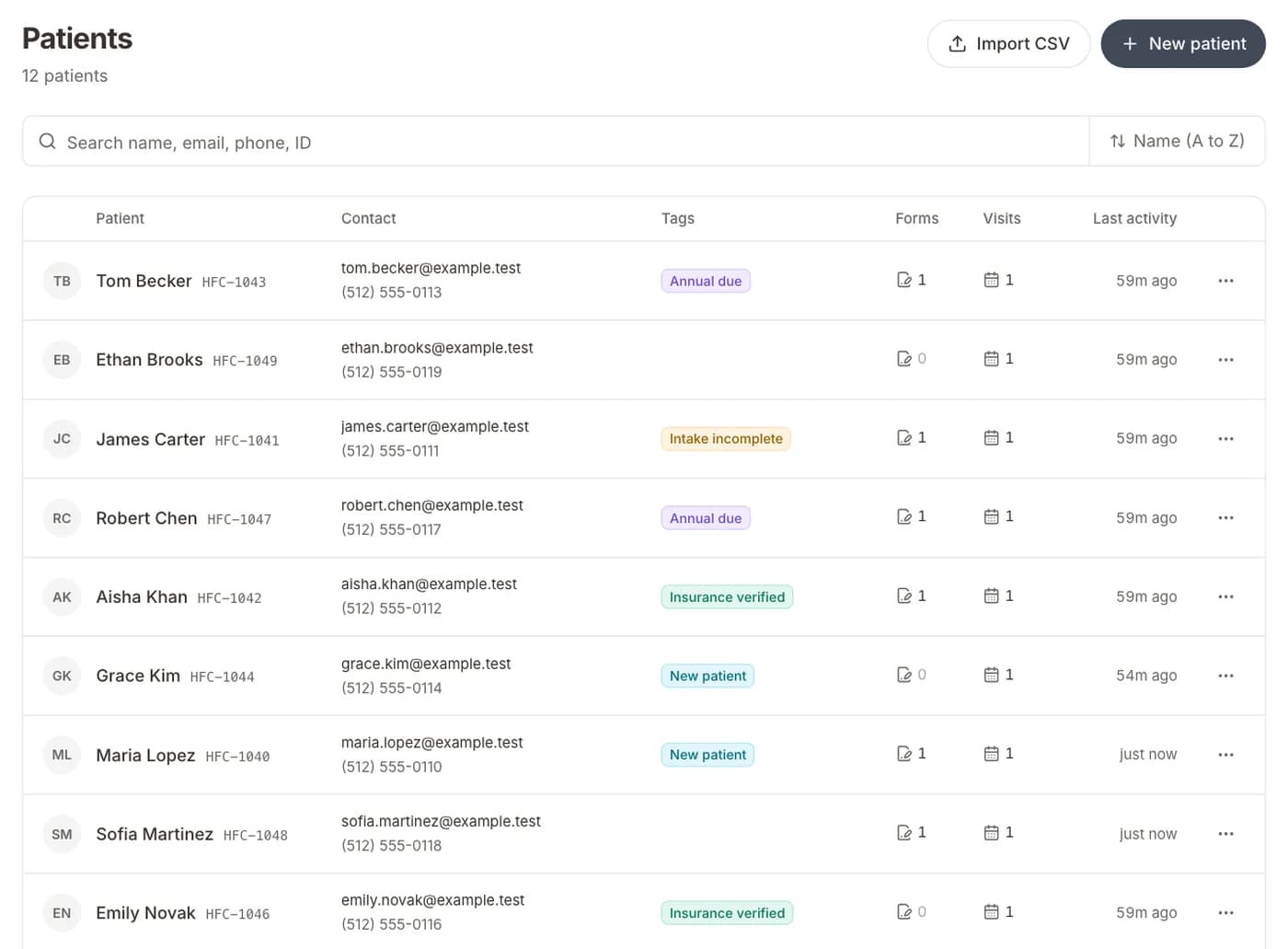
Search, filter, and view patient records from the dashboard. Export individual records or your entire patient roster as CSV for reporting or migration.

Key features

Everything included with patient management, built into the platform.

Auto-Detection from Forms

Patient fields like name, DOB, phone, and email are automatically mapped from form submissions — no manual data entry required.

Medical History Tracking

Track allergies, current medications, active conditions, and surgical history in a structured format attached to each patient record.

Insurance Information

Store insurance provider, plan details, group numbers, and member IDs. Information updates automatically when patients submit new forms.

Form Submission History

View every form a patient has submitted, organized chronologically. Click any submission to see the full response with all field values.

Bulk CSV Import

Migrating from another system? Import your existing patient roster from a CSV file in minutes. Map columns to patient fields during import.

CSV Export

Export your entire patient list or filtered subsets as CSV for reporting, billing reconciliation, or migration to another system.

Patient Search and Filters

Find patients instantly by name, date of birth, email, or phone number. Filter by insurance provider, last visit date, or form completion status.

Emergency Contacts

Store emergency contact information for each patient, automatically captured from intake forms or entered manually by staff.

Expected results

0
Manual data entry for new patients
100%
Form submissions linked to patients
< 1 min
To import existing patient roster

Ideal for

Practices tired of manual patient data entry
Clinics migrating from paper records
Multi-provider practices sharing patient records
Practices that want a searchable patient database
Organizations needing CSV import/export for reporting

Frequently asked questions

How does auto-detection work for patient records?

When a patient submits any form, Formisoft scans the fields for common patient identifiers — first name, last name, date of birth, phone, email, and insurance details. These are automatically mapped to the patient record without any configuration.

What happens if a returning patient submits a new form?

Formisoft matches the submission to the existing patient record using email or date of birth. The record is updated with any new information, and the form submission is added to their history.

Can I import patients from my existing system?

Yes. Formisoft supports CSV import for patient records. Upload your file, map the columns to patient fields, and your roster is imported in minutes. There's no limit on the number of records you can import.

Who can access patient records?

Admins and providers can view all patient records. Staff can access records relevant to their duties (scheduling, form management). Patient-level users can only see their own information. All access is logged for HIPAA compliance.

Ready to streamline your practice?

Start your free trial and see how patient management works in Formisoft. Every feature is included from day one.