Appointment Scheduling
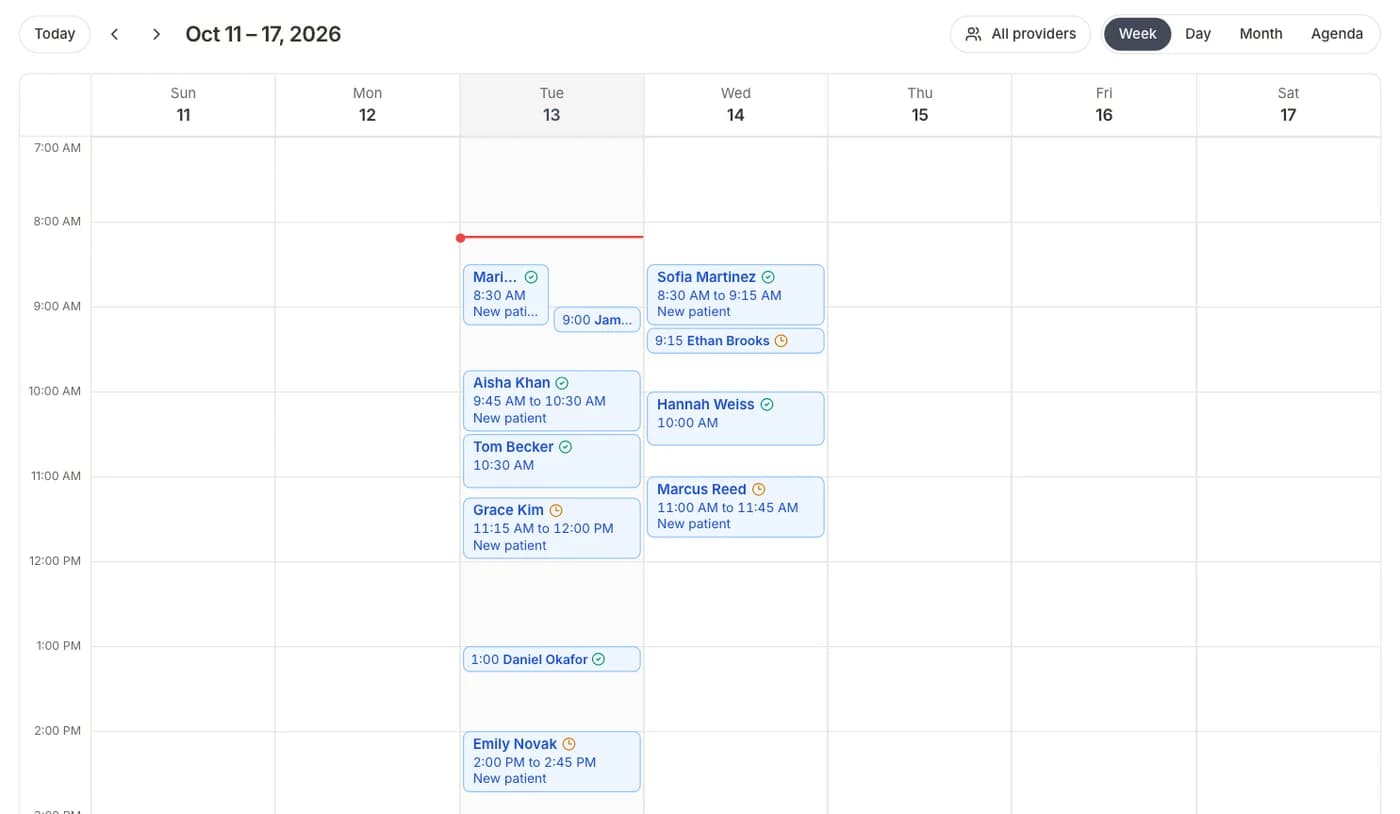
Full calendar with provider availability and conflict detection
Managing appointments shouldn't mean juggling phone calls, sticky notes, and double-booked slots. Formisoft gives your practice a full scheduling system with day and week calendar views, provider-specific availability windows, and automatic conflict detection — all connected to your intake forms.
Each provider sets their own availability schedule with configurable time slots, blocked-off hours, and appointment durations. When staff book an appointment, Formisoft checks for conflicts in real time and prevents double-booking. Appointments move through a clear status lifecycle — scheduled, confirmed, checked in, completed, no-show, cancelled — so your team always knows where things stand.
The real power is the connection between scheduling and intake. Every appointment can have an intake form attached, and patients receive it automatically when booked. By the time they arrive, their paperwork is done, their copay is collected, and your clinical team has reviewed their information. The calendar isn't just a schedule — it's the starting point for the entire patient visit workflow.
How it works
Set Provider Availability
Each provider configures their weekly availability — days, time ranges, slot durations, and break periods. Availability updates in real time across the system.
Book Appointments
Staff search for open slots by provider, date, or duration. Formisoft shows only available times and prevents double-booking automatically.
Attach Intake Forms
Link an intake form to the appointment. The patient receives it by email or SMS and completes it before their visit.
Track Status Through the Visit
Appointments progress from scheduled to confirmed, checked-in, completed, or cancelled. Your team sees the status at a glance on the calendar.
Key features
Everything included with appointment scheduling, built into the platform.
Day and Week Views
Switch between day and week calendar views. See all providers side-by-side or focus on a single provider's schedule.
Provider-Specific Availability
Each provider manages their own availability windows, appointment durations, and blocked time. No more manual coordination.
Conflict Detection
Automatic real-time conflict checking prevents double-booking. Staff see only genuinely available time slots when scheduling.
Status Lifecycle
Track appointments through every stage: scheduled, confirmed, checked in, in progress, completed, no-show, and cancelled.
Intake Form Attachment
Attach any intake form to an appointment type. Patients receive and complete it automatically before their visit.
Appointment Notes
Add internal notes to appointments visible only to staff. Document special requirements, interpreter needs, or prep instructions.
Color-Coded Calendar
Appointments are color-coded by status and type so your team can scan the calendar and understand the day's flow instantly.
Multi-Provider Support
View all providers on a single calendar or filter by individual. Perfect for group practices and multi-provider clinics.
Expected results
Ideal for
Frequently asked questions
Can each provider set their own availability?
Yes. Each provider has their own availability schedule with configurable days, time ranges, appointment durations, and break periods. Changes take effect immediately across the system.
Does the calendar prevent double-booking?
Yes. Formisoft checks for scheduling conflicts in real time. When staff try to book a slot that overlaps with an existing appointment, the system blocks it and suggests the nearest available time.
Can intake forms be sent automatically when an appointment is booked?
Yes. You can attach an intake form to an appointment. When the appointment is created, the patient automatically receives the form by email or SMS with a deadline to complete it before their visit.
What appointment statuses are available?
Appointments can be marked as scheduled, confirmed, checked in, in progress, completed, no-show, or cancelled. Staff can update status from the calendar or the appointment detail view.
Related
Patient Notifications
Automated email and SMS for every step of the patient journey
Learn moreFeaturePatient Management
Automatic patient records from every form submission
Learn moreFeatureTeam Management
Roles, permissions, and seat-based billing for your team
Learn moreWorkflowNew Patient Online Booking
From first click to chart-ready in minutes
Learn moreWorkflowPre-Visit Intake Automation
Every patient arrives chart-ready
Learn moreUse CaseAppointment Scheduling & Intake
Connect scheduling with automatic intake form delivery
Learn moreUse CaseNew Patient Intake
Digitize your entire new patient onboarding process
Learn moreUse CasePatient Intake for Multi-Provider Clinics
Unified intake for clinics with multiple specialties and providers
Learn moreReady to streamline your practice?
Start your free trial and see how appointment scheduling works in Formisoft. Every feature is included from day one.