Operations

Team Management

Roles, permissions, and seat-based billing for your team

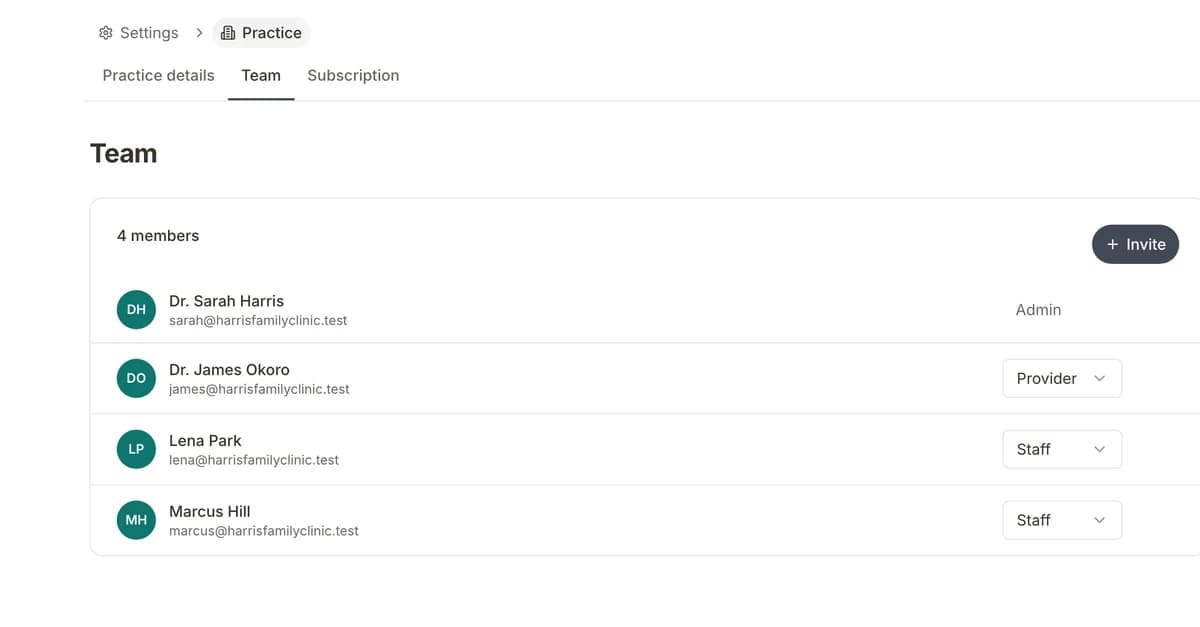
Growing a practice means growing a team, and every team member needs different access. Formisoft includes four built-in roles — admin, provider, staff, and patient — each with the right permissions so everyone sees what they need and nothing they shouldn't.

Team · 4 members
JS
Dr. Jane Smith
Admin
MJ
Dr. Mike Johnson
Provider
SK
Sarah Kim
Staff
DP
David Park
Staff
+ Invite team member

Admins manage the organization: billing, settings, team members, and full access to all data. Providers see their own schedule, patient forms, and clinical workflows. Staff members handle front-desk tasks like scheduling, form management, and patient check-in without accessing billing or org settings. Patient-level access lets patients view their own submitted forms and appointment details through a secure portal.

Adding team members is as simple as sending an email invite. New members pick their role during onboarding, and your subscription automatically adjusts through seat-based billing — no manual plan changes or contacting support. When someone leaves, removing their seat updates billing on the next cycle. For multi-provider practices, each provider can have their own availability schedule, form assignments, and notification preferences configured independently.

How it works

1
Step 1 of 4

Invite Team Members

Send email invitations to providers, staff, and administrators. Each person creates their account and is automatically added to your organization.

2
Step 2 of 4

Assign Roles

Choose from four built-in roles: admin, provider, staff, or patient. Each role has purpose-built permissions that control what they can see and do.

3
Step 3 of 4

Configure Provider Settings

Set up each provider's availability schedule, form assignments, and notification preferences individually. No two providers need the same setup.

4
Step 4 of 4

Billing Adjusts Automatically

Seat-based billing updates automatically when you add or remove team members. No manual plan changes or support tickets required.

Key features

Everything included with team management, built into the platform.

Four Built-In Roles

Admin, provider, staff, and patient roles with pre-configured permissions. Every team member gets the right level of access automatically.

Email Invitations

Invite team members by email. They create an account, accept the invitation, and join your organization — no manual setup required.

Per-Provider Configuration

Each provider has their own availability schedule, form assignments, notification preferences, and patient assignments.

Seat-Based Billing

Your subscription scales with your team. Adding or removing members automatically adjusts billing — no plan changes needed.

Role-Based Access Control

HIPAA-aligned permissions ensure team members only access the data they need. Audit trails track who accessed what.

Organization Dashboard

Admins see a complete view of the organization: team members, active forms, recent submissions, payment activity, and usage stats.

Quick Role Switching

Admins can change a team member's role at any time. Permissions update immediately without requiring the member to do anything.

Activity Audit Trail

Every action is logged — form edits, patient record access, setting changes — so you have a complete audit trail for compliance.

Expected results

4
Built-in role types
30 sec
To invite a new team member
100%
Automatic billing adjustments

Ideal for

Growing practices adding new providers
Multi-provider group practices
Practices with dedicated front-desk staff
Clinics that need role-based access for HIPAA compliance
Organizations managing multiple locations

Frequently asked questions

What are the four roles and their permissions?

Admin has full access to everything including billing and settings. Provider sees their schedule, patients, and forms. Staff handles front-desk tasks like scheduling and form management. Patient can view their own submitted forms and appointments.

How does seat-based billing work?

Each team member (admin, provider, or staff) counts as one seat on your subscription. When you invite a new member, the cost adjusts automatically on your next billing cycle. Removing a member reduces your seat count and cost.

Can I change someone's role after they've joined?

Yes. Admins can change any team member's role at any time from the team management page. The member's permissions update immediately — they don't need to take any action.

Is there a limit to how many team members I can add?

No hard limit. Your subscription scales with your team through seat-based billing. Add as many providers, staff, and admins as your practice needs.

Ready to streamline your practice?

Start your free trial and see how team management works in Formisoft. Every feature is included from day one.