CorePopular

E-Signatures

Electronic signatures with complete forensic audit trails

Paper consent forms create storage headaches, slow down patient flow, and leave your practice exposed to compliance risks. Formisoft's e-signature feature replaces paper with electronic signatures that are more secure, more auditable, and easier to manage than ink on paper.

Consent Form · Signature
Patient Signature
Verified
SHA-256 integrity confirmed
Audit Trail
SignedFeb 15, 2025 2:34 PM
IP Address192.168.1.•••
Hasha3f2c8...d91e

Every signature captured through Formisoft includes a complete forensic audit trail: the exact timestamp of signing, the signer's IP address and browser, a SHA-256 cryptographic hash for tamper detection, and the signer's name and email extracted automatically from the form. If a signature image is modified after signing, the hash will no longer match — providing evidence that the signature image has been altered.

Your staff can view the audit trail directly in the submission detail view, expand it to see every forensic detail, and generate a printable signing certificate for any signature — useful for compliance audits, insurance documentation, and dispute resolution. For practices that handle consent forms, HIPAA authorizations, treatment agreements, and financial responsibility documents, e-signatures with audit trails provide a stronger evidentiary record than paper alone. Consult your legal counsel to confirm e-signature requirements specific to your state and practice type.

How it works

1
Step 1 of 4

Add a Signature Field to Any Form

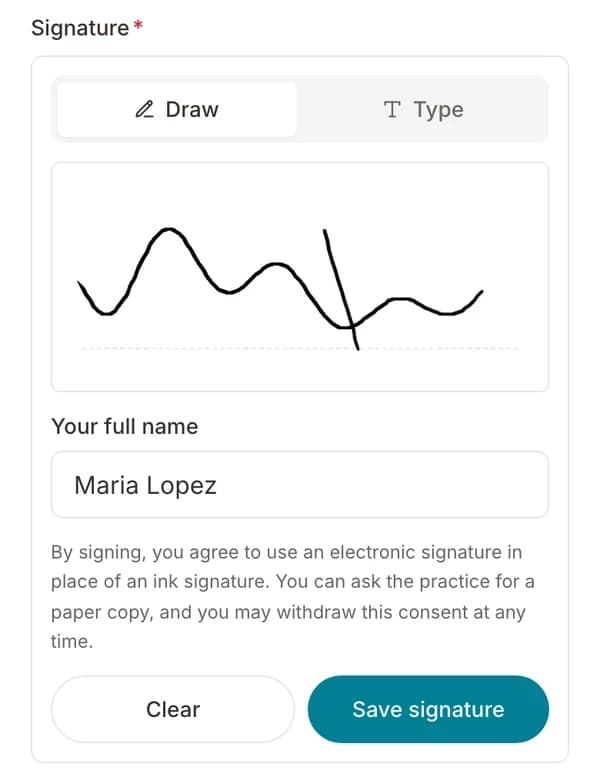
Drag a signature or consent agreement field onto your form. Patients can draw their signature or type their name to generate one.

2
Step 2 of 4

Patient Signs During Intake

When the patient signs, Formisoft captures the signature image, computes a SHA-256 hash, and records the timestamp and browser details — all in one step.

3
Step 3 of 4

Server Verifies the Signature

On submission, the server re-computes the hash independently to verify integrity, captures the signer's IP address, and links the signature to the signer's identity from other form fields.

4
Step 4 of 4

View Audit Trail or Print Certificate

Staff can expand the full audit trail on any submission, or generate a printable signing certificate with every forensic detail for compliance records.

Key features

Everything included with e-signatures, built into the platform.

SHA-256 Tamper Detection

Every signature is hashed with SHA-256 at signing time and verified server-side on submission. Any modification to the signature image after signing is cryptographically detectable.

Timestamped Audit Trail

Each signature records the exact date and time of signing in ISO 8601 format, documenting when every consent and authorization was captured.

IP Address Logging

The signer's IP address is captured server-side from request headers, providing geographic evidence of where the signature originated.

Signer Identity Capture

The signer's name and email are automatically extracted from other form fields and attached to the signature, linking identity to the signing event.

Printable Signing Certificate

Generate a signing certificate for any signature with all forensic details — useful for compliance audits, insurance documentation, and record-keeping.

Draw or Type Signatures

Patients can draw their signature with a finger or stylus, or type their name to generate a cursive signature — works on any device.

Verified / Unverified Badges

Every signature displays a verification badge. Green 'Verified' means the client hash matched the server hash. Unverified signatures are clearly flagged.

Backward Compatible

Existing submissions with legacy signatures continue to display normally. Audit trail data is captured automatically for all new submissions — no migration needed.

Expected results

100%
Signatures with forensic audit trail
SHA-256
Cryptographic tamper detection
1 click
To generate a signing certificate

Ideal for

Practices collecting consent forms and treatment agreements
Clinics handling HIPAA authorization signatures
Providers wanting auditable e-signature records
Organizations preparing for compliance audits
Practices replacing paper consent workflows
Specialties with high-risk procedure consents

Frequently asked questions

Are Formisoft e-signatures legally binding?

Formisoft e-signatures are designed to support the requirements of the federal ESIGN Act and state UETA laws by capturing signer intent (explicit sign action), signer attribution (name, email, IP address), and a complete audit trail with tamper detection. These are the core elements courts look for when evaluating electronic signatures. However, legal requirements vary by state and document type — we recommend consulting your legal counsel to confirm compliance for your specific use case.

What is included in the audit trail?

Every signature audit trail includes: the exact timestamp of signing, the signer's IP address, the browser and device used (user agent), a SHA-256 cryptographic hash of the signature image, the signer's name and email, and a verification status indicating whether the hash was confirmed server-side.

What is the signing certificate?

The signing certificate is a printable page that summarizes all forensic details for a specific signature — document information, signer identity, the signature image, timestamp, IP address, and the full SHA-256 hash. Use your browser's print function to save it as a PDF for your records.

What happens to existing submissions without audit trails?

Existing submissions continue to display normally. Signatures captured before the audit trail feature was enabled appear as images without forensic metadata. The certificate page shows a 'not available' notice for these legacy signatures. No data migration is needed.

How does tamper detection work?

When a patient signs, the browser computes a SHA-256 hash of the signature image data. When the form is submitted, the server independently computes the same hash. If both hashes match, the signature is marked as 'Verified' — meaning the image was not modified between signing and submission. If they don't match, it's flagged as 'Unverified'.

Ready to streamline your practice?

Start your free trial and see how e-signatures works in Formisoft. Every feature is included from day one.