On the Formisoft platform

Part of CollectPatient intake: digital, complete, before the visit

View full overview

Collect capability · Pro plan

Insurance Verification

Verify coverage automatically before the visit — inside your patient flows

Real-time eligibility checks inside Formisoft Flow — verified or failed on the chart before check-in.

SecondsTypical eligibility response time
250/moIncluded on Pro
Pre-visitCoverage confirmed before check-in

How it works

  1. Collect insurance during intake

    Patients enter carrier, member ID, group number, and card photos through your intake form. Data maps to the patient chart automatically — no re-typing at the front desk.

  2. Flow triggers when insurance is added

    Turn on the Insurance Verification playbook or add a Verify insurance step to any flow. Common trigger: Insurance needs verification — fires when new coverage lands on the chart.

  3. Real-time eligibility check runs

    Formisoft checks coverage with the payer using your practice NPI and the patient's member ID and date of birth. Results return in seconds, not hours on hold with a payer.

  4. Chart updates with coverage status

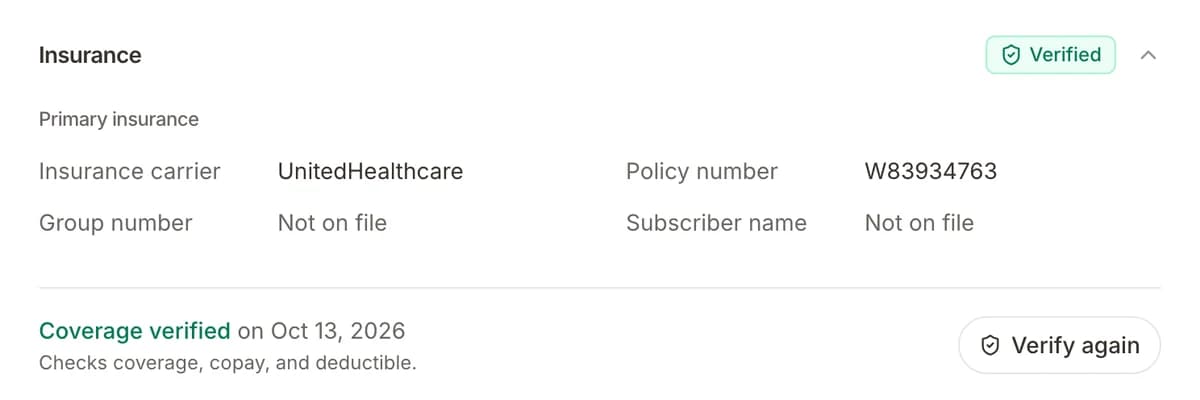
    The patient record shows verified, failed, or pending. Staff see plan name and copay or deductible details when returned. Every check is logged for your team.

  5. Automate what happens next

    Branch flows on insurance status: notify billing when verification fails, tag the patient for follow-up, or continue sending intake reminders only when coverage is confirmed.

More in Collect

Other tools that work with Insurance Verification in the same step.

Part of Collect on the platform

Built for real practices

What practices get with insurance verification, included from day one.

Built into Formisoft Flow

Verify insurance is a flow step — same visual builder as SMS reminders, review requests, and staff alerts. No separate eligibility tool to log into.

Real-time payer response

Checks run when your automation fires, not overnight in a batch. Billing knows coverage status before the patient arrives for today's appointments.

Results on the patient chart

Status, timestamp, and benefit summary live on the patient record. Staff review verified vs failed without exporting to spreadsheets.

Branch on insurance status

Use If / else steps on insurance status — verified, failed, pending, or unknown — to route staff alerts, tags, and patient messages automatically.

FAQ

How does insurance verification work in Formisoft?

When insurance information is collected on intake or updated on the patient chart, a Formisoft Flow can run a Verify insurance step. Formisoft sends a real-time eligibility request using your practice NPI and the patient's member ID and date of birth. The payer response updates insurance status on the patient record — verified, failed, or pending — and your flows can branch on that status.

What do I need set up before verification runs?

Your practice NPI in Settings → Practice, a Pro plan subscription, and patient insurance fields on file: carrier name, member ID, date of birth, and patient name. Optional: map common carrier names to payer IDs in practice settings for faster matching.

Is this the same as collecting insurance card photos?

No — card capture is intake. Verification is an eligibility check with the payer that confirms active coverage and can return plan name, copay, and deductible details. Most practices collect cards on intake, then let a flow verify coverage automatically.

What happens when verification fails?

The patient record is marked failed and your flow can notify billing by email, add a tag like needs-insurance-review, or send the patient a message to update their card. You control the follow-up in the flow builder.

More FAQs

Try Formisoft

Scheduling, patient intake, outreach, and reviews in one platform, one login.

Get started